> For the complete documentation index, see [llms.txt](https://docs.bifrost.io/llms.txt). Markdown versions of documentation pages are available by appending `.md` to page URLs; this page is available as [Markdown](https://docs.bifrost.io/faq/what-are-vtokens/mint-redeem-vtoken-without-dapp.md).
# Mint/Redeem vToken without Dapp
## Summary
This tutorial will guide you through vToken minting and redemption without using the Bifrost Dapp, or in case the Bifrost Dapp is temporarily unavailable.
## Where to do?
By using Polkadot.JS, you can directly interact with Bifrost parachain, calling specific functions such vToken minting or redemption. Choose the environment below, depends on where your assets at:
#### Bifrost-Polkadot (vDOT, vGLMR, vFIL, vASTR, vBNC)
{% embed url="" %}
#### Bifrost-Kusama (vKSM, vMOVR)
{% embed url="" %}
## Token and vToken Index Library
### Token Indexes on **Bifrost-Polkadot**
**NOTE**: Decimal means how many "0" follows 1 Token. E.g, DOT or vDOT decimal is 10, so 1 DOT = 10,000,000,000 which by followed up with ten "0".
| Token | Token ID, U8 | Decimals | Redeem Period (day) |
| ------ | ------------ | -------- | ------------------- |
| DOT | Token2, 0 | 10 | - |
| vDOT | vToken2, 0 | 10 | 0-28 |
| GLMR | Token2, 1 | 18 | - |
| vGLMR | vToken2, 1 | 18 | 0-7 |
| ASTR | Token2, 3 | 18 | - |
| vASTR | vToken2, 3 | 18 | 0-10 |
| FIL | Token2, 4 | 18 | - |
| vFIL | vToken2, 4 | 18 | 0-520 |
| MANTA | Token2, 8 | 18 | - |
| vMANTA | vToken2, 8 | 18 | - |
| BNC | Native, BNC | 12 | - |
| vBNC | vToken, BNC | 12 | 0-7 |
### Token Indexes on **Bifrost-Kusama**
**NOTE**: Decimal means how many "0" follows 1 Token. E.g, KSM or vKSM decimal is 12, so 1 KSM = 1,000,000,000,000 which by followed up with twelve "0".
| Token | Token ID, U8 | Decimals | Redeem Period (day) |
| ----- | ------------ | -------- | ------------------- |
| KSM | Token, KSM | 12 | - |
| vKSM | vToken, KSM | 12 | 0-7 |
| MOVR | Token, MOVR | 18 | - |
| vMOVR | vToken, MOVR | 18 | 0-2 |
## Quick Calls
Quick calls can help you quickly construct the transactions, but overview the details of each step in tutorials is strongly suggested.
{% hint style="info" %}
All the quick calls below had constructed with right decimals with 1 Token as cases, so you can just replace the 1st number to how many acutal tokens that you want to mint or redeem , so it works.
{% endhint %}
For example, if the value is 10,000,000,000 in the case below, and you want to mint or redeem 15 tokens, simply replace 1 with 15 so that it becomes 150,000,000,000 with the correct decimals.
| Token | Mint | Redeem |
| ------ | ------------------------------------------------------------------------------------------------------------------------------------------------------------------ | -------------------------------------------------------------------------------------------------------------------------------------------------------------- |
| vDOT | [1 vDOT](https://polkadot.js.org/apps/?rpc=wss%3A%2F%2Feu.bifrost-polkadot-rpc.liebi.com%2Fws#/extrinsics/decode/0x7300080000e40b540200000000000000000000000430) | [1 vDOT](https://polkadot.js.org/apps/?rpc=wss%3A%2F%2Feu.bifrost-polkadot-rpc.liebi.com%2Fws#/extrinsics/decode/0x7301090000e40b54020000000000000000000000) |
| vGLMR | [1 vGLMR](https://polkadot.js.org/apps/?rpc=wss%3A%2F%2Feu.bifrost-polkadot-rpc.liebi.com%2Fws#/extrinsics/decode/0x73000801000064a7b3b6e00d00000000000000000430) | [1 vGLMR](https://polkadot.js.org/apps/?rpc=wss%3A%2F%2Feu.bifrost-polkadot-rpc.liebi.com%2Fws#/extrinsics/decode/0x73010901000064a7b3b6e00d0000000000000000) |
| vASTR | [1 vASTR](https://polkadot.js.org/apps/?rpc=wss%3A%2F%2Feu.bifrost-polkadot-rpc.liebi.com%2Fws#/extrinsics/decode/0x73000803000064a7b3b6e00d00000000000000000430) | [1 vASTR](https://polkadot.js.org/apps/?rpc=wss%3A%2F%2Feu.bifrost-polkadot-rpc.liebi.com%2Fws#/extrinsics/decode/0x73010903000064a7b3b6e00d0000000000000000) |
| vBNC | [1 vBNC](https://polkadot.js.org/apps/?rpc=wss%3A%2F%2Fhk.p.bifrost-rpc.liebi.com%2Fws#/extrinsics/decode/0x730000010010a5d4e80000000000000000000000043000) | 1 [vBNC](https://polkadot.js.org/apps/?rpc=wss%3A%2F%2Fhk.p.bifrost-rpc.liebi.com%2Fws#/extrinsics/decode/0x730101010010a5d4e80000000000000000000000) |
| vFIL | [1 vFIL](https://polkadot.js.org/apps/?rpc=wss%3A%2F%2Feu.bifrost-polkadot-rpc.liebi.com%2Fws#/extrinsics/decode/0x73000804000064a7b3b6e00d00000000000000000430) | [1 vFIL](https://polkadot.js.org/apps/?rpc=wss%3A%2F%2Feu.bifrost-polkadot-rpc.liebi.com%2Fws#/extrinsics/decode/0x73010904000064a7b3b6e00d0000000000000000) |
| vMANTA | [1 vMANTA](https://polkadot.js.org/apps/?rpc=wss%3A%2F%2Feu.bifrost-polkadot-rpc.liebi.com%2Fws#/extrinsics/decode/0x73000808000064a7b3b6e00d00000000000000000430) | [1 vMANTA](https://polkadot.js.org/apps/?rpc=wss%3A%2F%2Feu.bifrost-polkadot-rpc.liebi.com%2Fws#/extrinsics/decode/0x73010908000064a7b3b6e00d0000000000000000) |
| vKSM | [1 vKSM](https://polkadot.js.org/apps/?rpc=wss%3A%2F%2Fbifrost-rpc.liebi.com%2Fws#/extrinsics/decode/0x730002040010a5d4e800000000000000000000000430) | [1 vKSM](https://polkadot.js.org/apps/?rpc=wss%3A%2F%2Fbifrost-rpc.liebi.com%2Fws#/extrinsics/decode/0x730101040010a5d4e80000000000000000000000) |
| vMOVR | [1 vMOVR](https://polkadot.js.org/apps/?rpc=wss%3A%2F%2Fbifrost-rpc.liebi.com%2Fws#/extrinsics/decode/0x7300020a000064a7b3b6e00d00000000000000000430) | [1 vMOVR](https://polkadot.js.org/apps/?rpc=wss%3A%2F%2Fbifrost-rpc.liebi.com%2Fws#/extrinsics/decode/0x7301010a000064a7b3b6e00d0000000000000000) |
## How to mint vToken?
1. Please make sure you select the right **chain of Polkadot JS** before you follow up with the following process, it depends on what vToken you want to mint, check above section at [Where to do](#where-to-do)?.
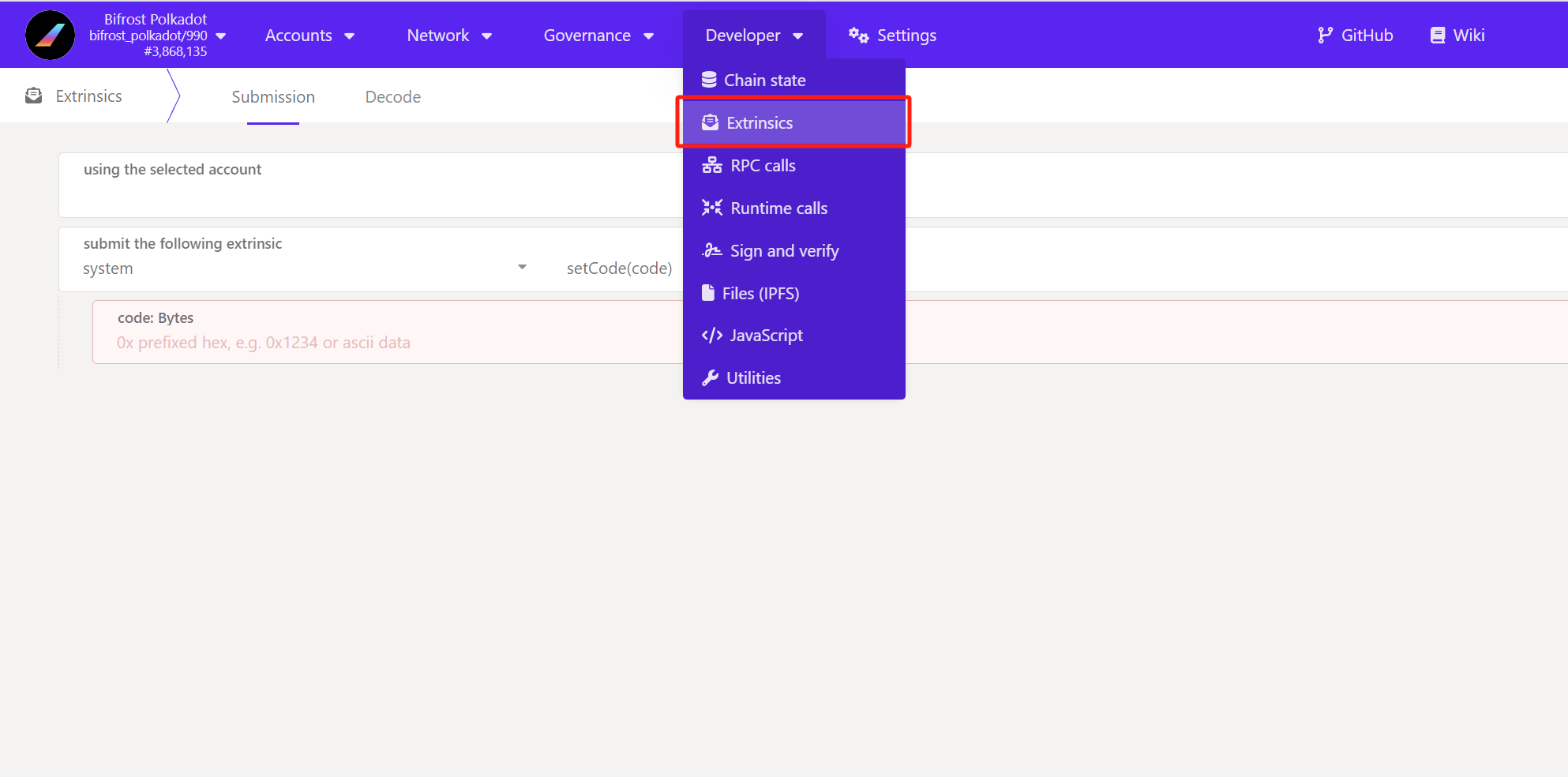
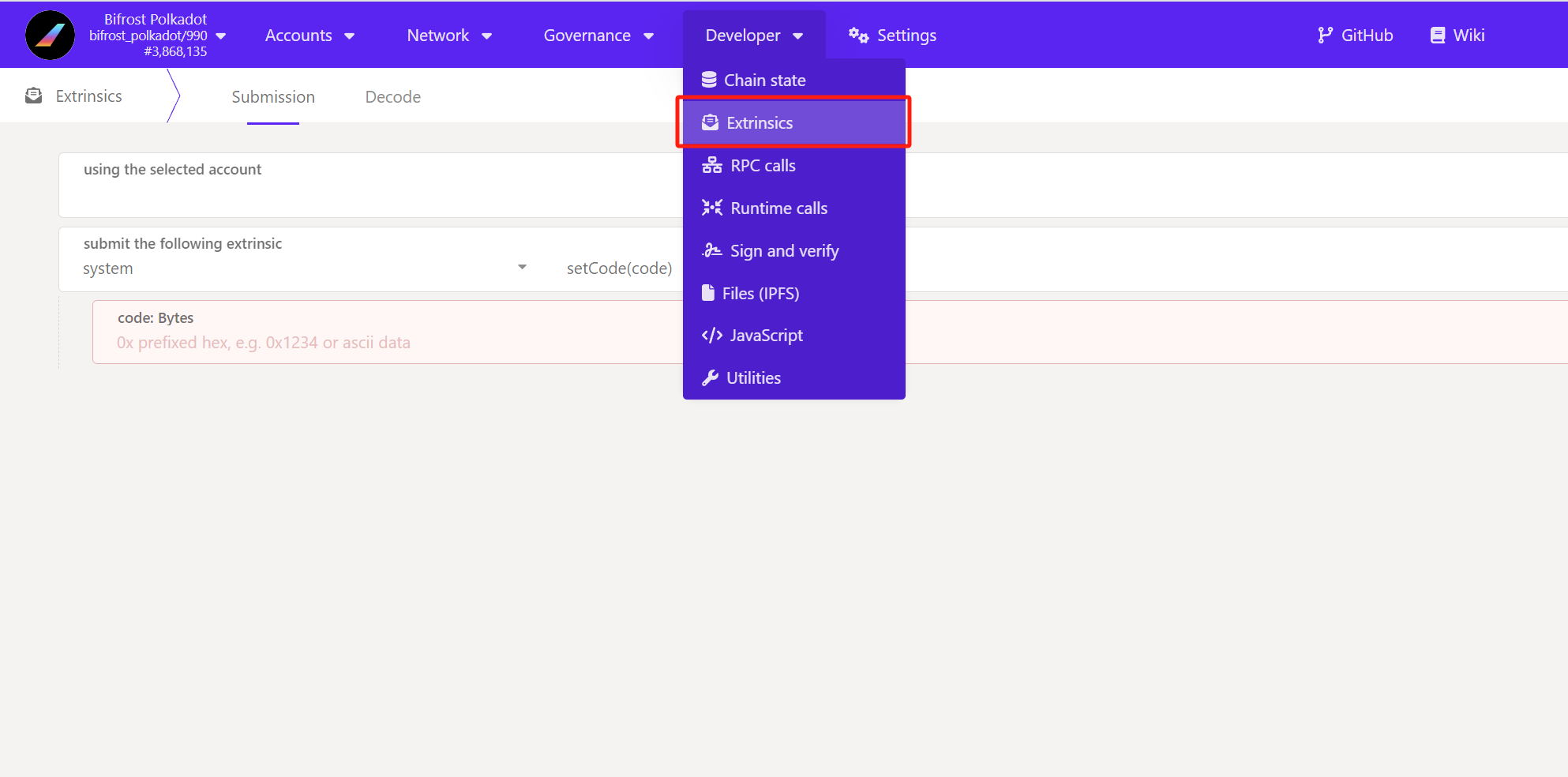
2. Selet Extrinsics
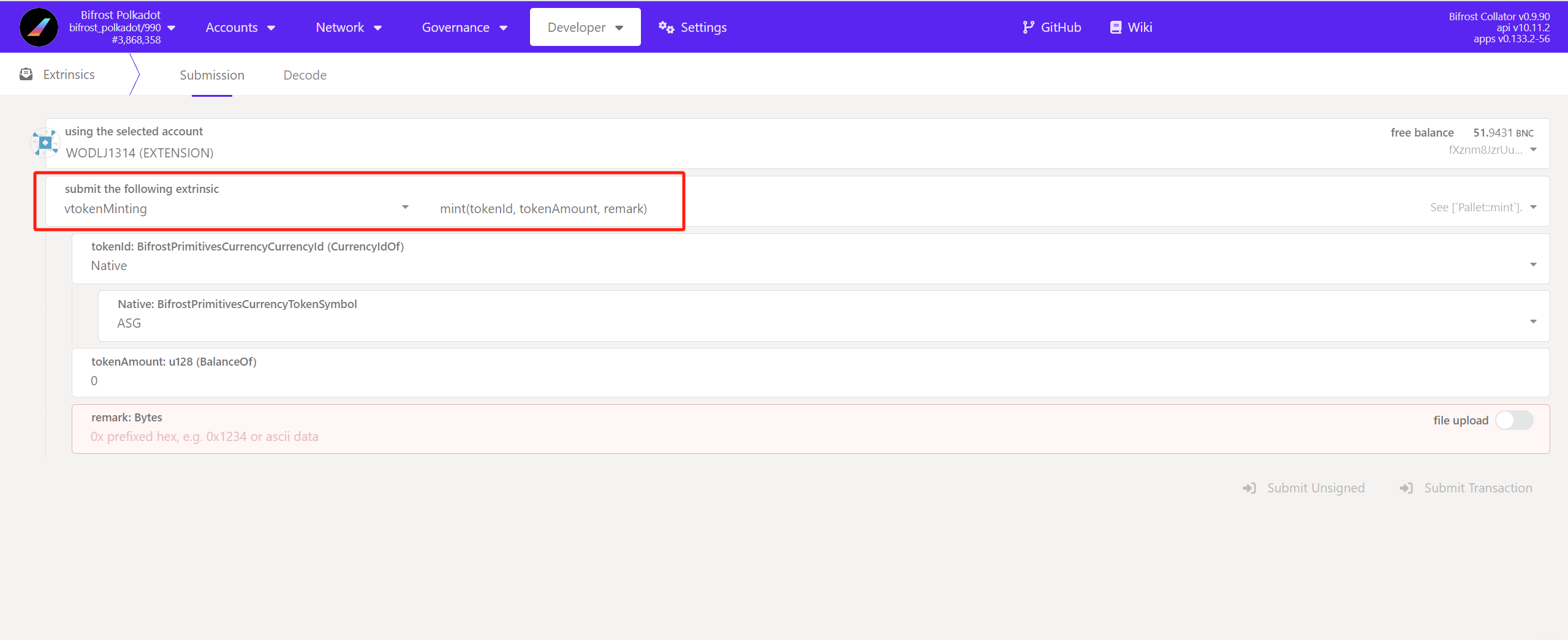
3. Select which address that you want to mint vToken, and construct `vtokenminting`, `mint` as below. (make sure you have BNC in balance to pay for transaction fee)
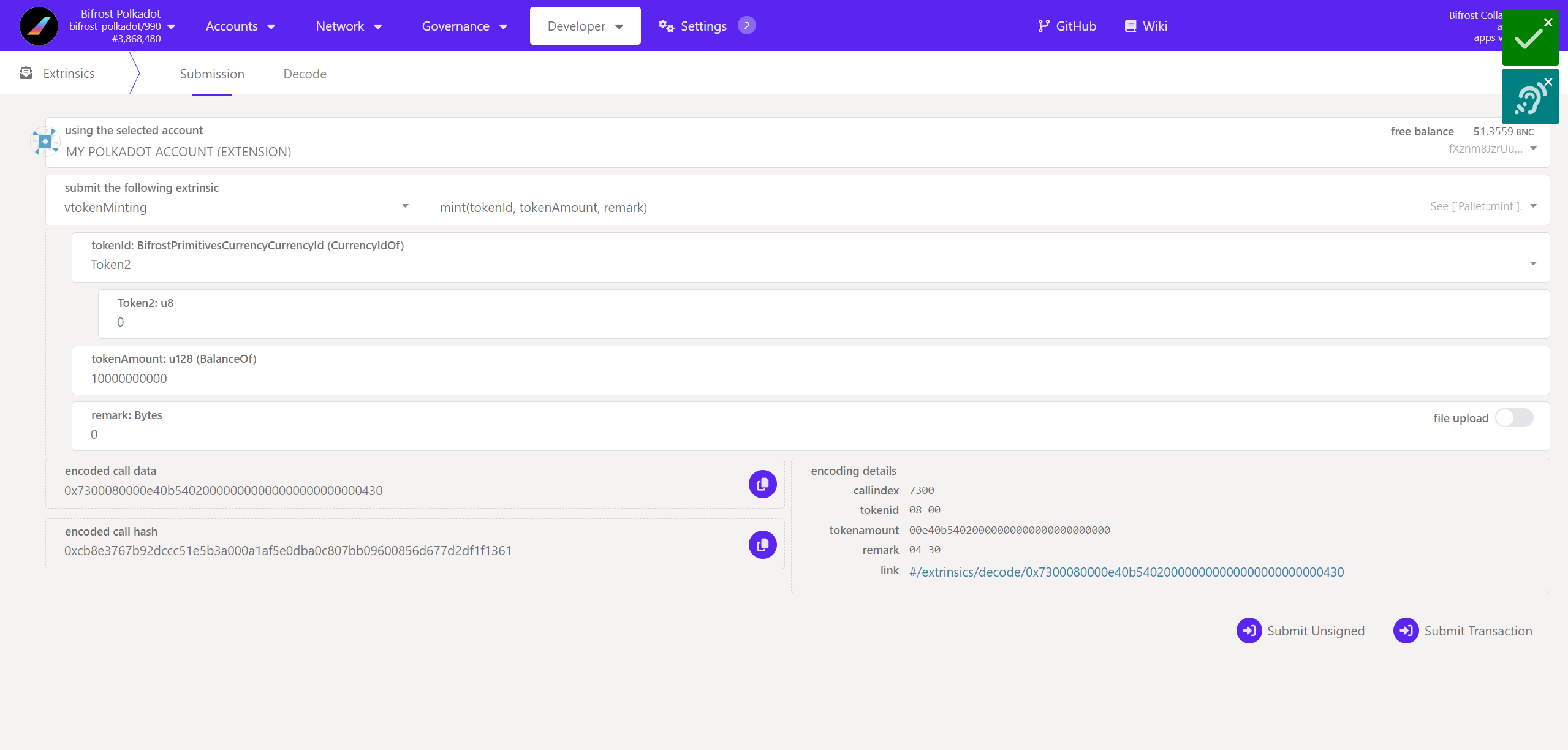
4. Fill up what token that you want to mint for, we take an example as using 1 DOT for vDOT minting here. (Check [Token Index Chart](#token-and-vtoken-index-library) to find what to put here.)
1. Since DOT index is Token2, 0, so we put Token2 in `tokenid`, and put 0 in `token2:u8`.
2. Since DOT decimal is 10, so we put 10,000,000,000 in `tokenAmount`
3. You can put anything in `remark`.
4. Submit and sign transaction. (make sure you have [wallet extension](broken://pages/BiuqWFgrXphDRkGkWK9L) installed)
5. Wait for transction processing and check the right corner, green means succeed, red means failed.
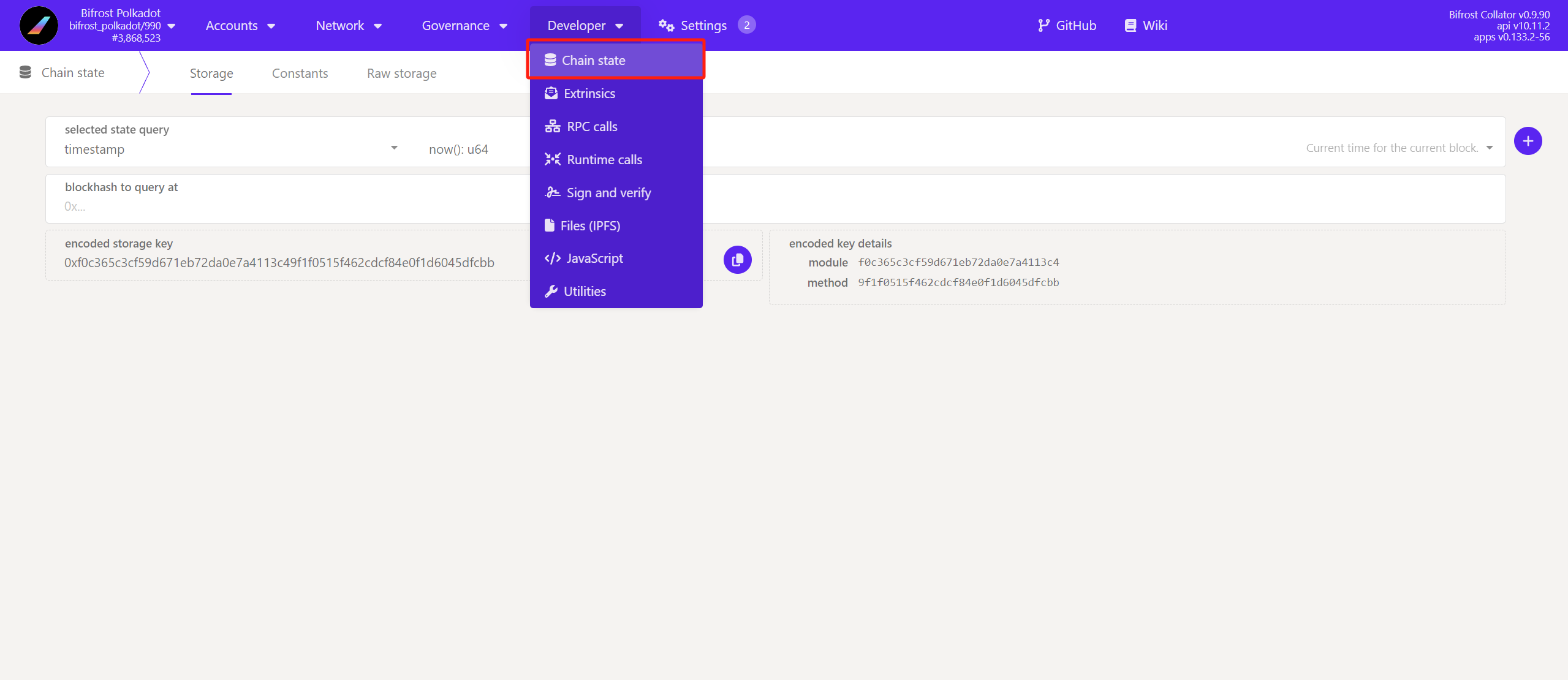
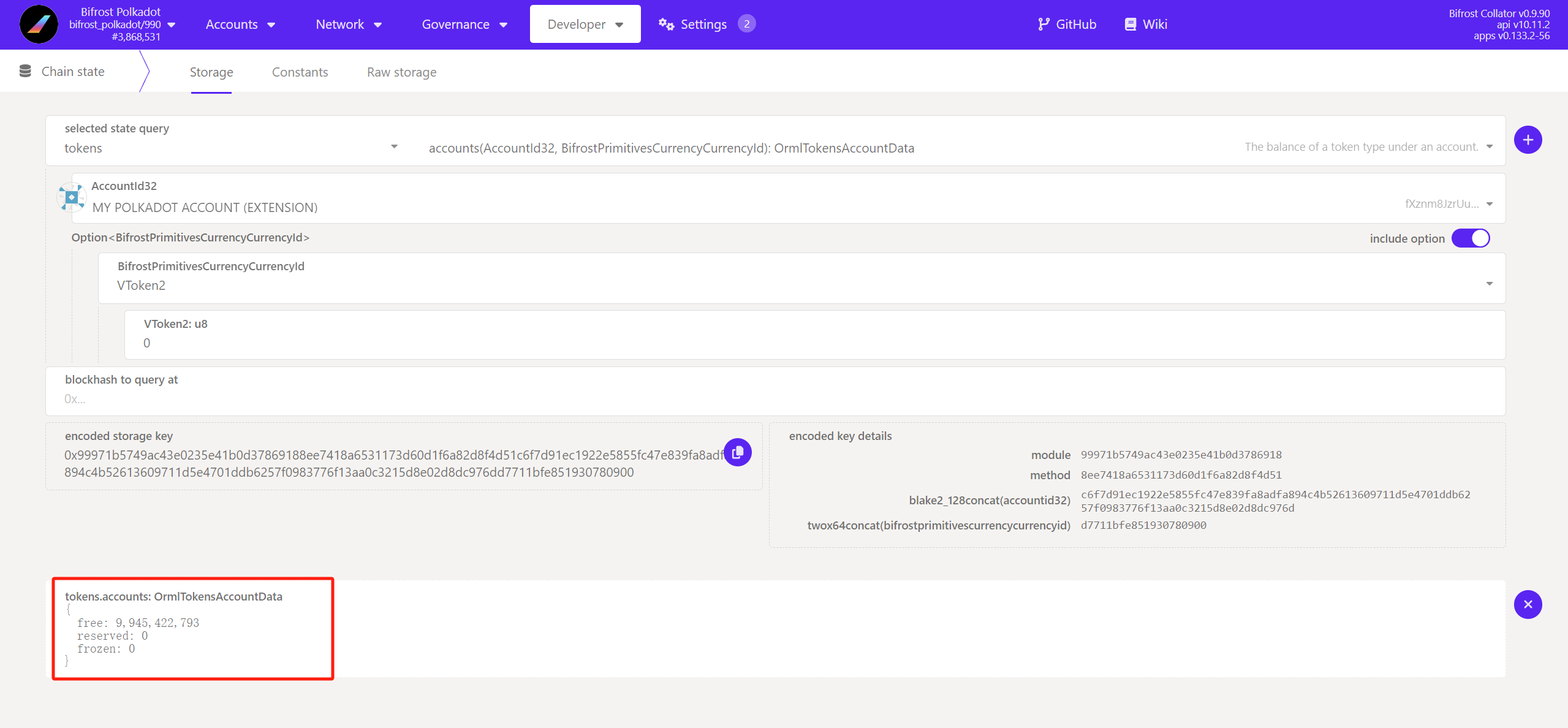
5. Check your balance by select Chain State
6. Select `tokens`, `accounts,`and input what token balance that you are checking for. In the above case, we used DOT to mint vDOT, so we want to check my vDOT balance here.
## How to redeem vToken?
1. Please make sure you select the right **chain of Polkadot JS** before you follow up with the following process, it depends on what vToken you want to mint, check above section at [Where to do](#where-to-do)?.
2. Selet Extrinsics
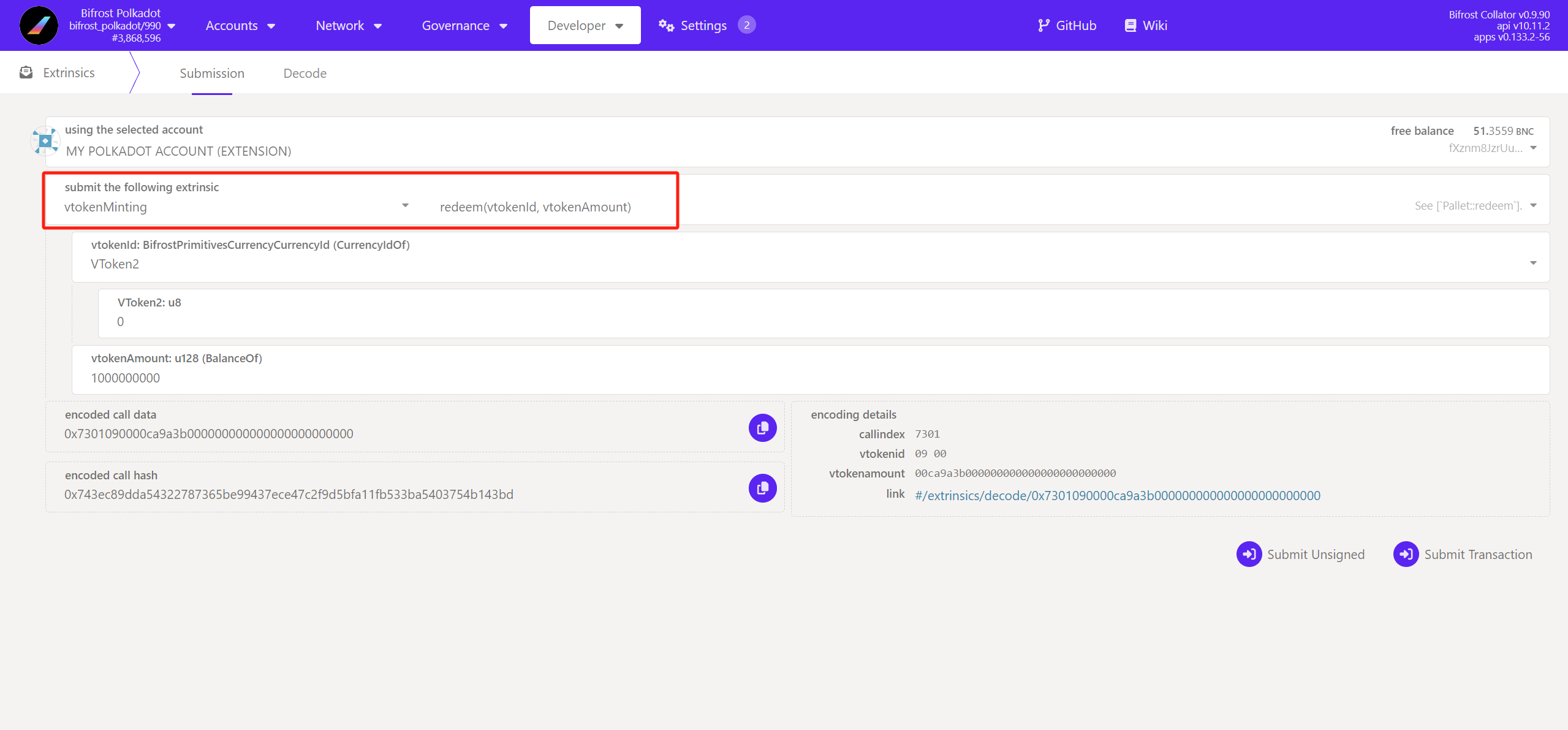
3. Select which address that you want to redeem vToken, and construct `vtokenminting`, `redeem`as below. (make sure you have BNC in balance to pay for transaction fee)
4. Fill up what token that you want to redeem for, we take an example as using 0.4 vDOT redeeming DOT here. (Check [Token Index Chart](#token-and-vtoken-index-library) to find what to put here.)\
**NOTE**: The minimum redeem for vDOT is 0.4 vDOT
1. Since vDOT index is vToken2, 0, so we put vToken2 in`tokenid`, and put 0 in `vtoken2:u8`.
2. Since vDOT decimal is 10, so we put 4,000,000,000 in `tokenAmount`
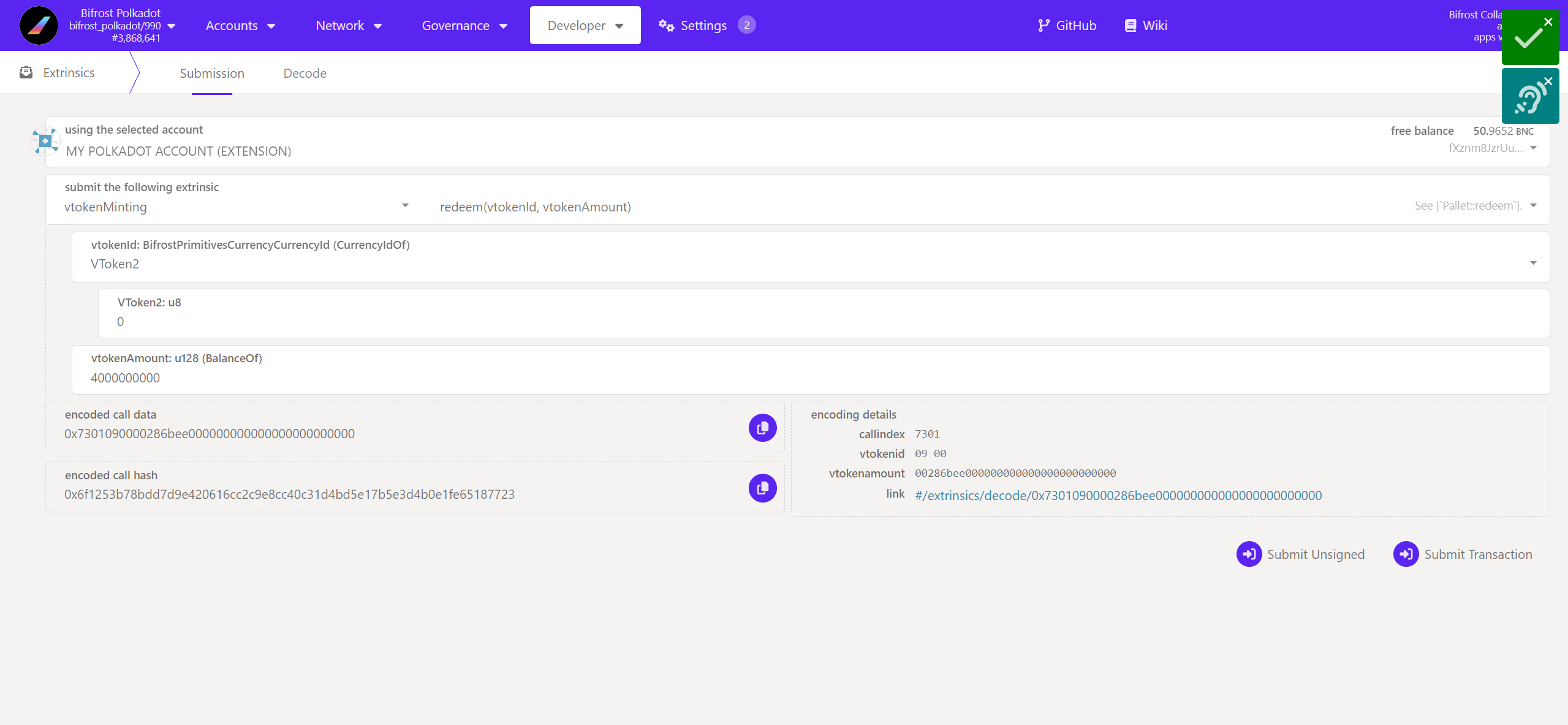
3. Submit and sign transaction. (make sure you have [wallet extension](broken://pages/BiuqWFgrXphDRkGkWK9L) installed)
4. Wait for transction processing and check the right corner, green means succeed, red means failed.
5. Wait for redemption period and receive Token back. Check corresponding redemption period of each vToken [above](#token-and-vtoken-index-library).
---
# Agent Instructions
This documentation is published with GitBook. GitBook is the documentation platform designed so that both humans and AI agents can read, navigate, and reason over technical content effectively. Learn more at gitbook.com.
## Querying This Documentation
If you need additional information that is not directly available in this page, you can query the documentation by asking a question.
Perform an HTTP GET request on the following URL with the `ask` and `goal` query parameters:
```
GET https://docs.bifrost.io/faq/what-are-vtokens/mint-redeem-vtoken-without-dapp.md?ask=&goal=
```
`ask` is the immediate question: it should be specific, self-contained, and written in natural language.
`goal` is what the user is ultimately trying to achieve, the reason they need the answer. Sharing it helps GitBook give you a better, more relevant answer. A goal is most helpful when it describes the outcome the user wants rather than restating the question. For example, with `ask=how do I create an API token`, a goal like `automate deployments from our CI pipeline` lets GitBook tailor the answer to that use case.
The response will contain a direct answer to the question and relevant excerpts and sources from the documentation.
Use this mechanism when the answer is not explicitly present in the current page, you need clarification or additional context, or you want to retrieve related documentation sections.