> For the complete documentation index, see [llms.txt](https://docs.bifrost.io/llms.txt). Markdown versions of documentation pages are available by appending `.md` to page URLs; this page is available as [Markdown](https://docs.bifrost.io/for-the-community/governance/on-chain-identity.md).
# On-chain Identity
Background
All Bifrost proposal posters are required to publicly disclose their on-chain identity by registering through default fields such as legal name, display name, website, Twitter handle, Riot handle, etc.
The overall process takes 3 steps:
1. Identity Registration
2. Request Verification
3. Providing Judgement
### Identity Registration
Autonomous identity register is required on both Bifrost Polkadot & Bifrost Kusama at the first step
1. Go to [polkadot.js](https://polkadot.js.org/apps/#/accounts), choose Bifrost parachain.
2. The easiest way to add the built-in fields is to click the three vertical dots next to your account and select "Set on-chain identity".
3. A popup will appear, offering the default fields. Use the toggle to fill in any fields you wish.
4. Click "Set Identity" to finish the process.
### Request Verificaiton
#### Option 1: Send Email
Send email to by **using your on-chain identified email in previous step**. Here is a template:
Identity Judgement Request: Alice
Idendity Name: Alice (Your Identified name in previous step)
Address: eCSrvbA5gGNYdM3UjBNxcBNBqGxtz3SEEfydKragtL4pJ4F (Your identified address)
Existing fellowship member will provide you judgement once they received the request.
#### Option 2: Request varification judgement on chain
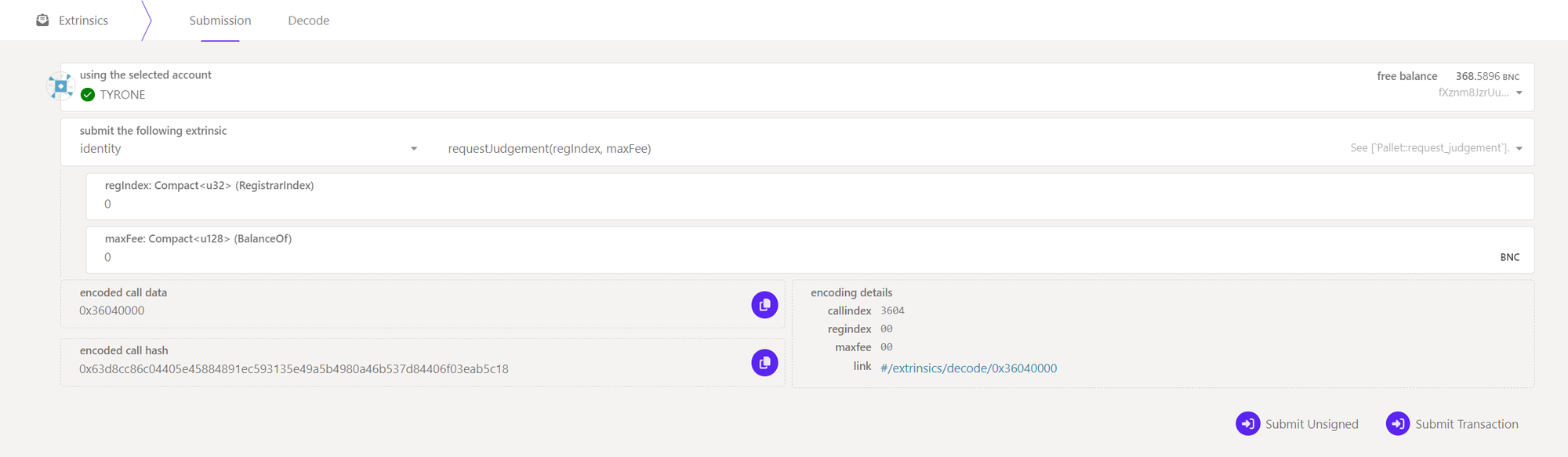
To be judged after submitting your identity information, go to the [Extrinsics tab in the Polkadot-JS UI](https://polkadot.js.org/apps/#/extrinsics) (Make sure you choose the right network) and select the `identity` pallet, then `requestJudgement`.
For the `reg_index` put the index of the registrar you want to be judged by, and for the `max_fee` put the maximum you're willing to pay for these confirmations.
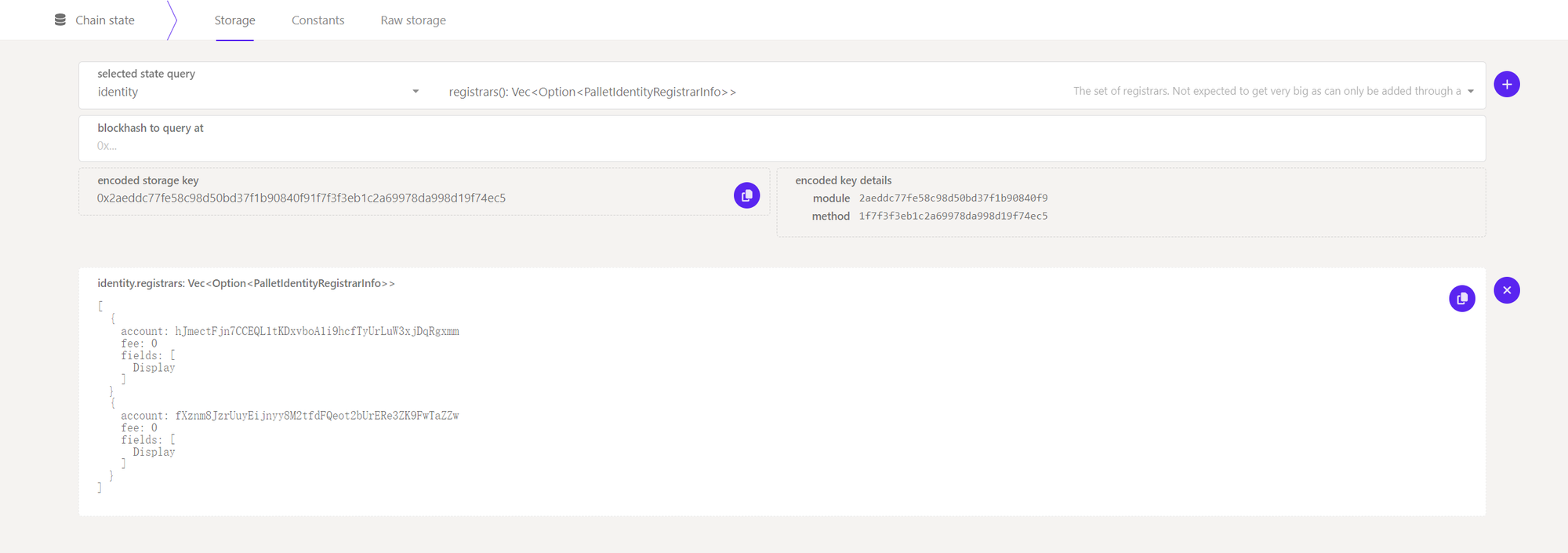
If you don't know which registrar to pick, first check the available registrars by going to [Chain State tab in the Polkadot-JS UI](https://polkadot.js.org/apps/#/chainstate) (Make sure you choose the right network) and selecting identity.registrars() to get the full list.
To find out how to contact the registrar after the application for judgement or to learn who they are, you can check their identity by adding them to your Address Book. Their identity will be automatically loaded.
#### Option 3: Request varification judgement in person
If you have direct contact with any Fellowship member, just ask for a judgement.
### Providing Judgement
Once any identifier received judgement request, they will providing corresponding judgements by following types below:
Normally, there are two types of judgements to be provided:
1. Known good
Who met in person with identifier.
2. Resonable
Who passed verification process with any identifier.
---
# Agent Instructions
This documentation is published with GitBook. GitBook is the documentation platform designed so that both humans and AI agents can read, navigate, and reason over technical content effectively. Learn more at gitbook.com.
## Querying This Documentation
If you need additional information that is not directly available in this page, you can query the documentation by asking a question.
Perform an HTTP GET request on the following URL with the `ask` and `goal` query parameters:
```
GET https://docs.bifrost.io/for-the-community/governance/on-chain-identity.md?ask=&goal=
```
`ask` is the immediate question: it should be specific, self-contained, and written in natural language.
`goal` is what the user is ultimately trying to achieve, the reason they need the answer. Sharing it helps GitBook give you a better, more relevant answer. A goal is most helpful when it describes the outcome the user wants rather than restating the question. For example, with `ask=how do I create an API token`, a goal like `automate deployments from our CI pipeline` lets GitBook tailor the answer to that use case.
The response will contain a direct answer to the question and relevant excerpts and sources from the documentation.
Use this mechanism when the answer is not explicitly present in the current page, you need clarification or additional context, or you want to retrieve related documentation sections.